Quickstart: Deploying and Evaluating RAG Assistant with FlexRAG#
This quickstart guide will help you deploy or evaluate the RAG assistant with FlexRAG. FlexRAG provides multiple ways to develop and evaluate your RAG assistant, including configuring the built-in RAG assistant and deploying a GUI application using FlexRAG’s entrypoints, or developing your own RAG assistant by importing FlexRAG as a library.
In FlexRAG, a RAG assistant is similar to a traditional chatbot but can generate responses by leveraging an external knowledge base. As a result, many RAG-related operations are encapsulated within the RAG assistant, such as determining when retrieval is needed, how to perform retrieval, and how to process the retrieved documents.
FlexRAG provides several built-in RAG assistants, including BasicAssistant, ModularAssistant, ChatQAAssistant, .etc. You can run these assistants with FlexRAG’s entrypoints. In this guide, we will show you how to run the ModularAssistant, as it offers a wide range of configuration options.
The basic structure of the ModularAssistant is as follows:
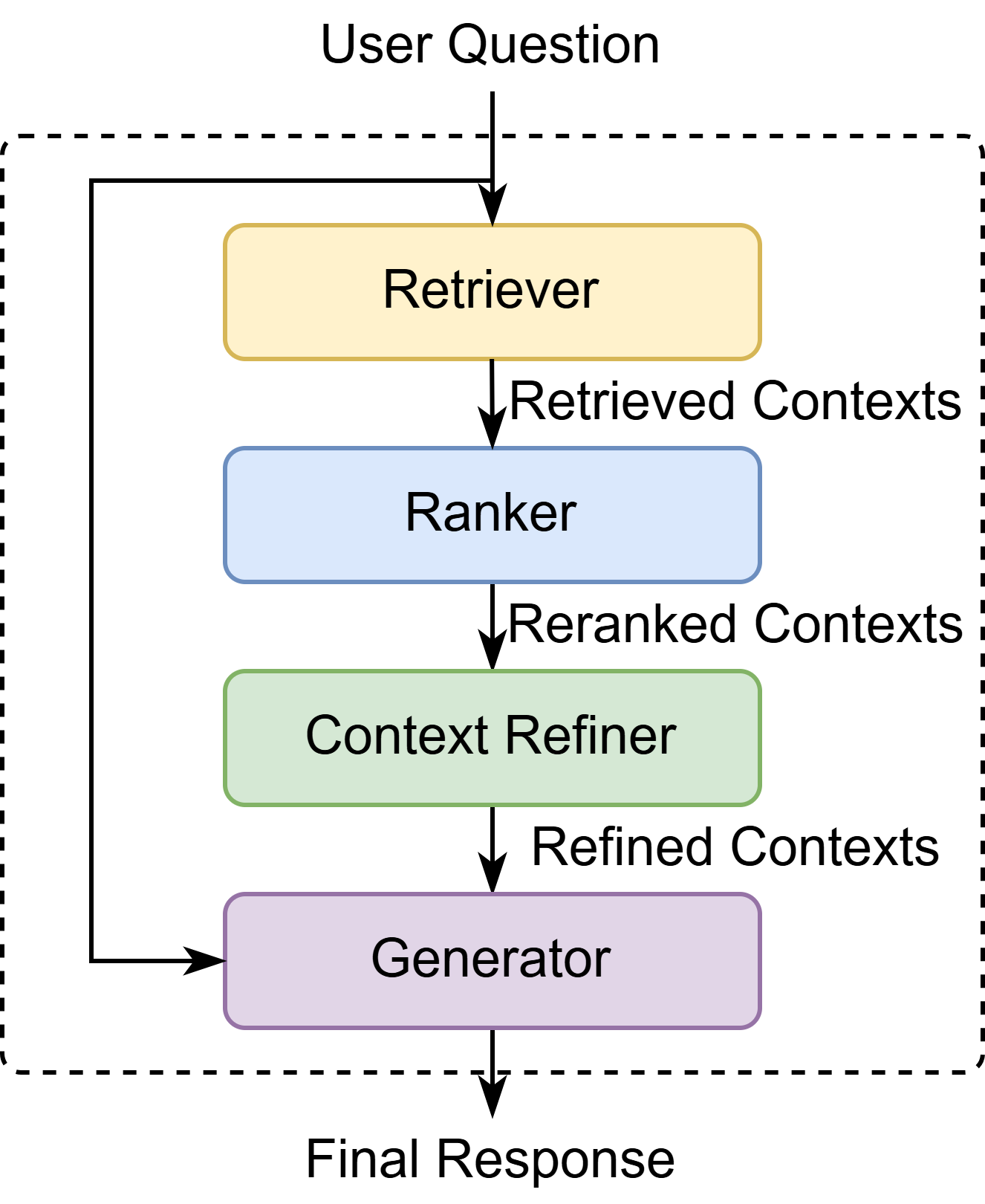
The ModularAssistant is composed of four key components: a retriever, a reranker, a context refiner, and a generator.
The retriever fetches relevant passages from the knowledge base.
The reranker reorders the retrieved passages for better relevance, which is optional.
The context refiner optimizes the context for the generator, which is optional.
The generator creates the final response based on the (refined) context.
Each component can be configured independently, allowing you to easily customize your RAG assistant by adjusting the settings for each one.
Deploying a GUI application#
The easiest way to run a RAG assistant is to use FlexRAG’s entrypoints to start a GUI application. You can run the following command to start a GUI application with the ModularAssistant. In the following command, a retriever based on Wikipedia knowledge base provided by FlexRAG and a generator from OpenAI are used to build a typical RAG pipeline. Make sure to replace $OPENAI_KEY with your OpenAI access key.
python -m flexrag.entrypoints.run_interactive \
    assistant_type=modular \  # Specifies the assistant type
    modular_config.retriever_type='FlexRAG/enwiki_2021_atlas' \  # Specifies the retriever
    modular_config.response_type=original \
    modular_config.generator_type=openai \
    modular_config.openai_config.model_name='gpt-4o-mini' \
    modular_config.openai_config.api_key=$OPENAI_KEY \
    modular_config.do_sample=False
Then you can visit the GUI application at http://localhost:7860 in your browser. You will see a simple interface where you can input your question and get the response from the RAG assistant.

Note
In this example, we employ the pre-built FlexRetriever based on the Wikipedia knowledge base. You can also use other retrievers provided by FlexRAG or build your own retriever. For more information, please refer to the Preparing the Retriever section.
Evaluating the RAG assistant#
FlexRAG also offers convenient command-line tools to assist you in evaluating your RAG assistant. You can easily evaluate your RAG assistant on a variety of knowledge-intensive tasks. The following command let you evaluate the above assistant on the Natural Questions (NQ) dataset:
python -m flexrag.entrypoints.eval_assistant \
    name=nq \
    split=test \
    assistant_type=modular \
    modular_config.retriever_type="FlexRAG/enwiki_2021_atlas" \
    modular_config.response_type=short \
    modular_config.generator_type=openai \
    modular_config.openai_config.model_name='gpt-4o-mini' \
    modular_config.openai_config.api_key=$OPENAI_KEY \
    modular_config.do_sample=False \
    eval_config.metrics_type=[retrieval_success_rate,generation_f1,generation_em] \
    eval_config.retrieval_success_rate_config.eval_field=text \
    log_interval=100
As before, it is also necessary to replace $OPENAI_KEY with your OpenAI access key here.
In the command above, the parameters name=nq and split=test specify that the evaluation is to be conducted on the test set of the NQ dataset. The parameter eval_config.metrics_type=[retrieval_success_rate,generation_f1,generation_em] indicates that during the evaluation, the retrieval success rate, the corresponding F1 score for generation, and the Exact Match score for generation are to be calculated.
Note
For more information about the RAG evaluation tasks, please refer to the RAGEvalDatasetConfig class.
For more information about the evaluation metrics, please refer to the Metrics section.
Running the RAG assistan directly#
You can also run the RAG assistant directly in your Python code. The following code snippet demonstrates how to run the ModularAssistant with a FlexRetriever and an OpenAIGenerator:
from flexrag.assistant import ModularAssistant, ModularAssistantConfig
from flexrag.models import OpenAIGeneratorConfig


def main():
    cfg = ModularAssistantConfig(
        response_type="original",
        retriever_type="FlexRAG/enwiki_2021_atlas",
        generator_type="openai",
        openai_config=OpenAIGeneratorConfig(
            model_name="gpt-4o-mini",
            api_key="<your-api-key>",
        ),
        do_sample=False,
    )
    assistant = ModularAssistant(cfg)
    response, contexts, metadata = assistant.answer("Who is Bruce Wayne?")
    return


if __name__ == "__main__":
    main()
Similar to before, you need to replace <your-api-key> in the code above with your API key.
In the command above, we use the answer method to pose a question to the assistant and receive three return values: response, contexts, and metadata. Here, response is the final reply from the assistant, while contexts are the relevant documents retrieved by the assistant, and metadata contains additional information from the generation process.
Note
For more information about the RAG Assistant class, please refer to the Assistant section.
Developing your own RAG assistant#
You can also develop your own RAG assistant by inherit the AssistantBase class and registering it with the ASSISTANTS decorator. Then you are able to run your own RAG assistant using FlexRAG’s entrypoints by adding the user_module=<your_module_path> argument to the command.
You can find more information in the Developing your own RAG assistant tutorial.