Advance: Acquiring Information from the Web#
WebRetriever is a special type of retriever that is used to retrieve resource from the web. The resource could be retrieved by using existing search engines (ie. Google, Bing, etc.) or by accessing the website like a human.
With internet access, WebRetriever has significant advantages in both the timeliness of retrieval and the breadth of information it can access, making it particularly suitable for building personal agents.
In this tutorial, we will show you how to load / build the WebRetriever for your project.
Important
Since using computer programs to obtain internet information may be illegal in certain circumstances, or some websites may employ anti-crawling mechanisms to block your access, please ensure that such actions are legal in your region before using WebRetriever.
Using FlexRAG’s Predefined WebRetriever#
The easiest way to use the WebRetriever is to use the predefined WebRetriever provided by FlexRAG.
FlexRAG provides two predefined WebRetrievers:
SimpleWebRetrieverwhich retrieves most relevant webpages using existing search engine and convert the HTML content into a LLM friendly format using theWebReader.WikipediaRetrieverwhich retrieves information from Wikipedia directly. This retriever is adapted from theReACTproject.
In this tutorial, we will show you how to use the SimpleWebRetriever to retrieve information from the web.
Retrieving the Snippet Using the Existing Search Engine#
Most web search engines provide a snippet of the webpage in the search result. This snippet is usually a short description of the webpage that can be used to understand the content of the webpage. In FlexRAG, you can use the following code to load a web retriever, which will search for the five most relevant web pages for your query and return the corresponding snippets.
from flexrag.retriever import SimpleWebRetriever, SimpleWebRetrieverConfig

config = SimpleWebRetrieverConfig(
    top_k=5,  # Retrieve top 5 webpages
    search_engine_type="ddg",  # Use DuckDuckGo as the search engine
    web_reader_type="snippet",  # Return the snippet provided by the search engine
)
retriever = SimpleWebRetriever(config)
ctxs = retriever.search("Who is Bruce Wayne?")[0]
In the code above, we utilized DuckDuckGo as the search engine. FlexRAG also provides interfaces for other search engines for your convenience. For more details, please refer to the SearchEngineConfig’s documentation.
Retrieving the Full Web Page Content#
However, the snippet provided by the search engine might be too simplistic to generate a good response.
In such cases, you may want to retrieve the full webpage and extract information from it.
Yet another challenge is that raw webpages contain numerous HTML tags and other information irrelevant to the actual content. Feeding these directly into an LLM not only introduces a significant amount of noise but also results in excessively lengthy context.
To address this issue, FlexRAG offers the WebReader class, which transforms raw web resources into a format that is more compatible with large language models.
For instance, if you wish to extract information from all the webpages retrieved by the search engine, you can utilize the following code snippet.
from flexrag.retriever import SimpleWebRetriever, SimpleWebRetrieverConfig
from flexrag.retriever.web_retrievers import JinaReaderConfig

config = SimpleWebRetrieverConfig(
    top_k=5,  # Retrieve top 5 webpages
    search_engine_type="ddg",  # Use DuckDuckGo as the search engine
    web_reader_type="jina_reader",  # Extract all information from the HTML webpage
    jina_reader_config=JinaReaderConfig(
        api_key="<your-jina-api-key>",  # Jina API key
    )
)
retriever = SimpleWebRetriever(config)
ctxs = retriever.search("Who is Bruce Wayne?")[0]
In the code above, we used the JinaReader, a service provided by Jina AI that can extract information from the HTML webpage, to extract information from the HTML webpage. You can get the API key from the Jina AI website.
FlexRAG also provides other WebReaders, such as the ScreenshotWebReader, which captures webpage screenshots, and the JinaReaderLM, which uses a local model. For more details, please refer to the WebReaderConfig’s documentation.
Retrieving the Screenshots of the Web Page#
With the significant advancements in Visual Large Models (VLMs) for processing image information, even complex images like webpage screenshots can now be handled effectively. As a result, FlexRAG provides a unique web reader that converts web pages into screenshots. The following code demonstrates how to use ScreenshotWebReader to convert web pages retrieved by DuckDuckGo into screenshots.
from flexrag.retriever import SimpleWebRetriever, SimpleWebRetrieverConfig
from flexrag.retriever.web_retrievers import JinaReaderConfig

config = SimpleWebRetrieverConfig(
    top_k=5,  # Retrieve top 5 webpages
    search_engine_type="ddg",  # Use DuckDuckGo as the search engine
    web_reader_type="screenshot",  # Capture the screenshot of the webpage
)
retriever = SimpleWebRetriever(config)
ctxs = retriever.search("Who is Bruce Wayne?")[0]
After running the code above, you will get the screenshot of the top 5 webpages. The screenshot will be stored as a PIL.Image.Image object in the RetrievedContext.
Note
The screenshot feature requires the playwright package. Please make sure you have installed the playwright package before using the screenshot feature.
Building Your Own WebRetriever#
If you want to build your own WebRetriever, you can inherit the WebRetriever class and implement the search method. Of course, you can also define your own web retriever using the various web access tools provided by FlexRAG.
FlexRAG’s WebRetriever utilities#
FlexRAG provides several utilities to help you build your own WebRetriever:
WebSeeker: A utility class that helps you to retrieve web resources based on the search query.WebReader: A utility class that helps you to extract information from the raw web resources.WebDownloader: A utility class that helps you to download the web resources.
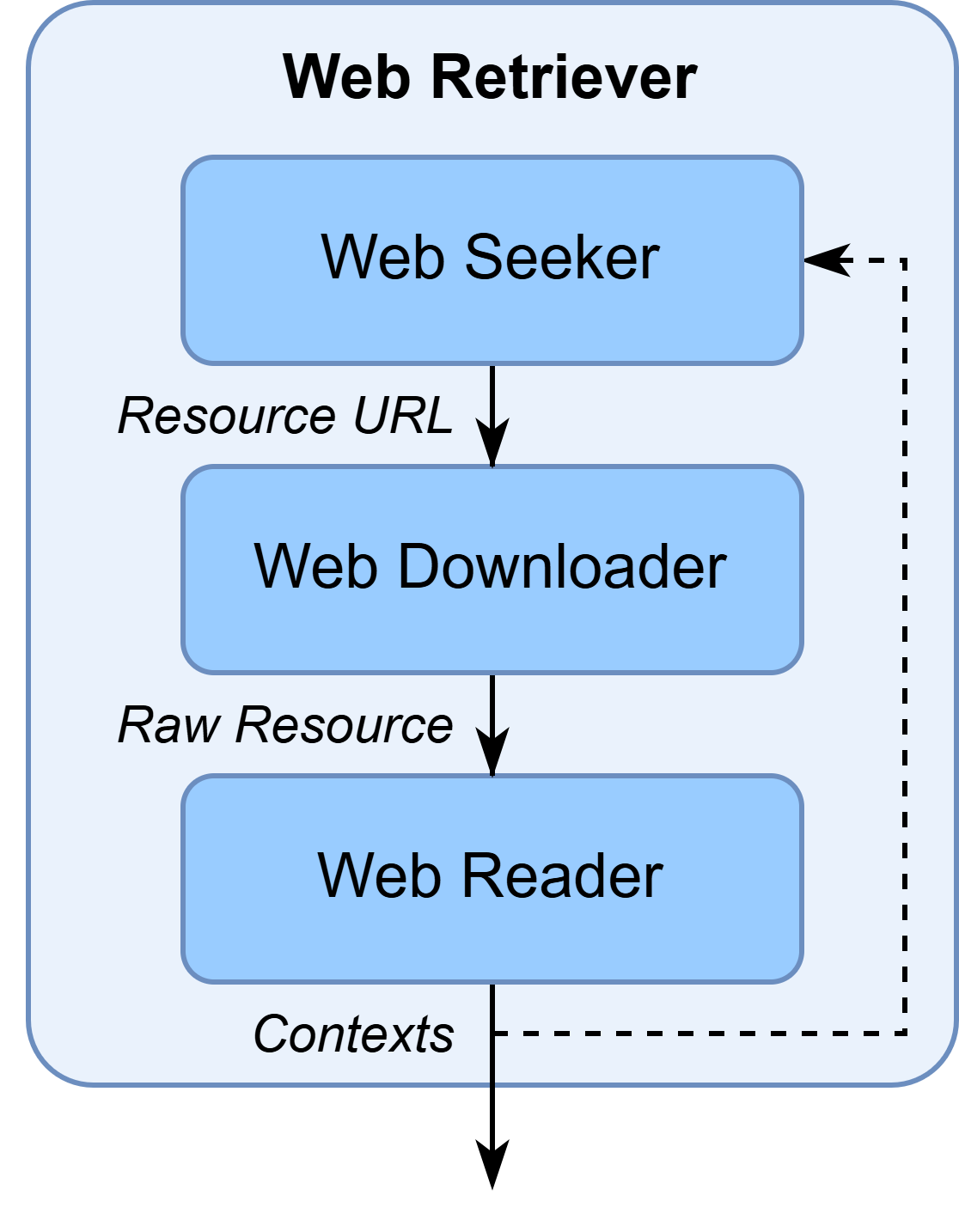
For more details, please refer to the Web Seeker , Web Reader , and Web Downloader ‘s documentation.